
If you are looking at an Anker SOLIX F3800 or F3800 Plus with the Smart Home Power Kit, the battery is the easy part of the decision. The part the product page does not cover is what has to change in your electrical panel before it can back up your house — and that is where most of the questions we get about this system actually live.
SparkWise Electric installs whole-home battery backup systems across Northern Virginia and quotes the Anker SOLIX kit regularly. This page walks through what the installation involves, drawn from Anker’s own installation guide and from the way we scope these jobs. We install the equipment; we are not affiliated with Anker.
What the Kit Actually Is
The Smart Home Power Kit is not one product. It is three, and homeowners often price only the first:
- The battery — Anker SOLIX F3800 or F3800 Plus. A 3.84 kWh portable power station with a 6,000-watt output, expandable with up to six BP3800 batteries to about 26.9 kWh. It is on wheels, which is unusual in this category and matters more than it sounds — see below.
- The Anker SOLIX Home Power Panel (model A17B1). A wall-mounted unit that sits between your main panel and the battery. It handles one or two F3800 units, monitors the grid and any solar through clamp-on current transformers, and decides when the battery charges, discharges or carries the house.
- The 24-Circuit Backup Load Center. An optional sub-panel. It is optional only if you never want backup — Anker’s guide is explicit that Backup Mode requires it. The kit also includes the 100-amp breaker that ties the Home Power Panel into your main panel.
Capacities and specifications change as Anker revises the lineup, so confirm the current figures for the exact bundle you are buying.
Daily Mode or Backup Mode? Decide Before You Buy
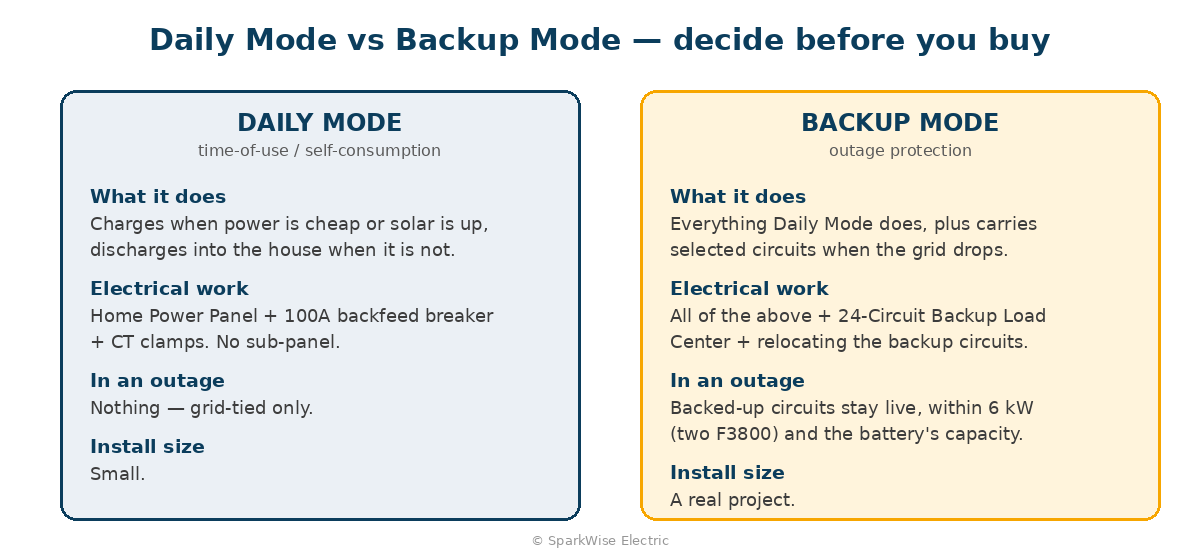
Anker’s Home Power Panel runs in two modes, and they need different amounts of electrical work.
Daily Mode is time-of-use and self-consumption: the battery charges when power is cheap or the sun is out and discharges into the house when it is not. It uses the grid wiring only — no backup load center — and it does nothing for you in an outage.
Backup Mode is what most people are buying this for. It requires the 24-Circuit Backup Load Center, and it requires physically moving the circuits you want protected out of your main panel and into it. That relocation is the bulk of the electrical labour, and it is where the design conversation happens.
If you have not bought yet, this is the decision that changes the quote. A Daily Mode install is a small job. A Backup Mode install is a real one.
What the Installation Involves
Anker’s installation guide sets the constraints; we work inside them. The shape of a Backup Mode install:
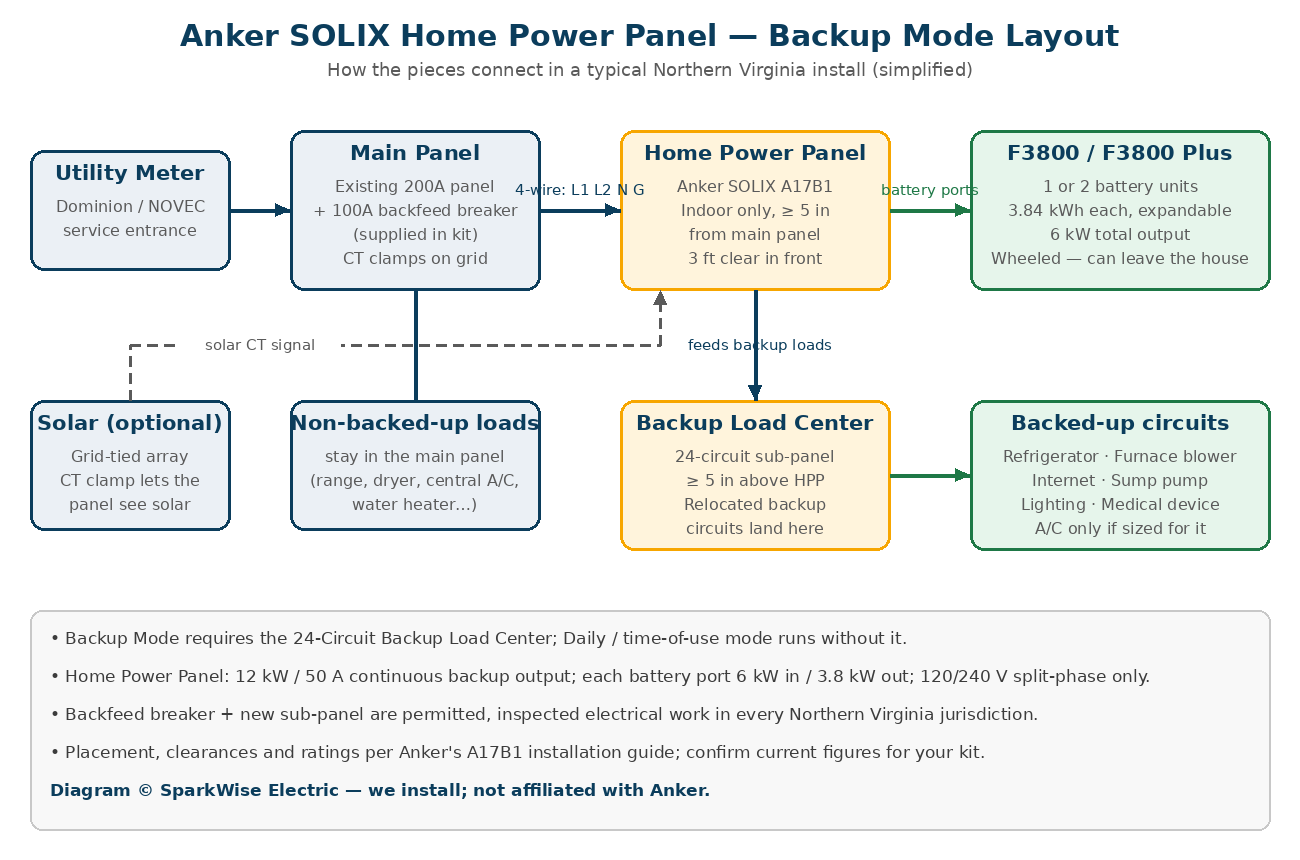
- Indoors only. The Home Power Panel is designed for a dry, ventilated indoor location. If your main panel is outside, Anker recommends the Home Power Panel be within 16 feet of it, and the Backup Load Center next to the main panel.
- Clearances. At least five inches between the Home Power Panel and the main panel, three feet of clear workspace in front, and the Backup Load Center at least five inches above the Home Power Panel. Basements and garages usually have the wall space; utility closets often do not.
- A 100-amp backfeed breaker in your main panel — supplied in the kit — feeding the Home Power Panel over a four-wire connection: two lines, neutral and ground. Your main panel needs the space and the capacity for it, which is a load-calculation question before it is anything else.
- Current transformers clamped on the grid conductors, and on the solar conductors if you have a grid-tied system, so the panel can see what the house is doing.
- Move the backup circuits into the Backup Load Center. In our quotes this is typically a handful of 120-volt branch circuits plus a two-pole circuit for something larger, with matching breakers and a ground bar kit in the new panel.
- Connect the battery through the Home Power Panel’s dedicated ports, land the conduit between panels, commission, and label.
- Permit and inspection. This is permitted electrical work involving your service equipment, and a backfeed breaker is something inspectors look at closely.
How Much Backup You Actually Get
The specification worth reading is not the battery’s headline number. It is the Home Power Panel’s backup output: 12 kW and 50 amps continuous, and the battery ports behind it, which total 6 kW continuous from two F3800 units and about 3.8 kW from one.
That is enough for a well-chosen set of circuits — refrigeration, furnace or air-handler blower, internet, some lighting and receptacles, a sump pump, a medical device. It is not a whole house. Central air, an electric range or an electric water heater will take a large share of that output and drain the battery quickly. We will walk the panel with you and work out which circuits earn their place before anything is ordered.
Runtime depends entirely on that list. One F3800 running a fridge, a furnace blower and internet is a very different night from two F3800s running those plus a window unit. We will talk through realistic numbers for your circuits rather than quote a headline figure.
Cross-Shopping Another Whole-Home Battery?
The electrical work for the Anker kit is nearly identical to the other smart-panel battery systems we install — a backfeed breaker, a managed sub-panel, relocated circuits, a permit. Where the products differ is architecture and portability: the F3800 rolls and can leave the house, and Anker splits the job into two boxes on the wall (Home Power Panel plus Backup Load Center) where some competitors use one. If you are deciding between this and the EcoFlow DELTA Pro Ultra, tell us what you want the battery to do and we will tell you which one fits. We install either.
Permits and Inspection
A backfeed breaker in your main panel and a new sub-panel carrying relocated circuits are both permitted work. Fairfax County handles this through its electrical permit process, Loudoun through LandMARC, Prince William and Stafford through their portals, and the independent cities through their own offices. Requirements, fees and inspection scheduling vary by jurisdiction and change, so we confirm the current process with your authority having jurisdiction rather than assuming.
Be cautious of an installer who offers to skip this. A backfeed connection into service equipment without a permit is the kind of thing that surfaces at resale, and an inspector will want to see it.
What Drives the Cost
We quote every one of these individually. What moves the number:
- Daily Mode or Backup Mode — the single biggest variable, because Backup Mode means a second panel and relocated circuits.
- How many circuits you want backed up, and how far they have to travel to reach the new panel.
- Whether your main panel has space and capacity for a 100-amp backfeed breaker, or needs attention first.
- Wall space and location — indoor, with the clearances Anker requires, close to the main panel.
- Whether solar is involved, which adds a second set of current transformers and coordination.
- Permit and inspection fees for your jurisdiction.
We will give you a fixed price after seeing the panel, including on a free video call. Send a photo of your main panel and the wall beside it and we can usually tell you whether the layout works before you order.
If You Bought the Bundle
Anker sells the F3800 with the Smart Home Power Kit direct and through warehouse retailers, and a good share of the calls we get start with the boxes already in the garage. The answer is almost always that it can be installed — but it is a real electrical project, and the wall space, the clearances and the main-panel capacity are worth checking before the delivery, not after.
Common Questions
Can I install it myself?
Permit and inspection requirements are set by your local authority having jurisdiction, and they vary. What we would say plainly is that a backfeed breaker into your main panel is not a good place to learn, and uninspected work on service equipment is difficult to unwind later.
Do I need the Backup Load Center?
Only if you want backup. Anker’s guide is explicit that Backup Mode requires it. Daily Mode — time-of-use and self-consumption — runs without it, and does nothing in an outage.
Will it run my whole house?
No. It runs the circuits you moved into the Backup Load Center, within the panel’s continuous output, for as long as the battery holds under that load. Anyone telling you otherwise is selling.
Can it go in the garage?
Yes, if the garage is dry and ventilated and the wall meets the clearances. Anker rates the Home Power Panel for indoor use only, so an exterior wall next to an outdoor main panel needs a different layout — usually the panel just inside, within Anker’s distance limit.
Can I just use a transfer switch instead?
Anker’s guide does allow the F3800 to feed a manual transfer switch or an inlet box, which is a smaller install without the smart panel. You lose the automatic switching and the app control. If you mainly want outage backup and do not care about time-of-use, it is a legitimate cheaper path and we will tell you so. We will not, under any circumstances, back-feed a receptacle with a cord.
Do you install equipment I bought myself?
Yes — that is most of these jobs. We warrant our workmanship; the manufacturer warrants the hardware.
Talk to Us Before the Boxes Arrive
SparkWise Electric is a licensed and insured electrical contractor serving Northern Virginia and Maryland. We install whole-home battery backup systems, permitted and inspected in each jurisdiction. Call (703) 915-5351 or book a free video call estimate. If you are still weighing a battery against a generator, our generator installation page and our overview of whole-home battery backup in Northern Virginia cover that comparison.
Comparing a battery with a standby generator? See Generac and Kohler standby generator installation.